Build video accessibility into the systems you already run
A developer API, an MCP connector for Claude, and signed webhooks connect Recap’s captions, transcripts, AI summaries, translations and audio descriptions to your agenda software, website, LMS and records archive, whether you have ten videos or ten thousand.
Available on annual plans
Text description of this animation
See it in 30 seconds
A short cut from our full Recap tour: how your team can build on Recap with the API, the MCP server and webhooks.
Captioned. Want the whole story? Watch the full 12-minute tour on our home page. Audio descriptions are available too: watch the audio described version in Recap.
One platform, three ways to connect
Use any one on its own or combine them. Together they take Recap out of a browser tab and into the places your staff, residents, students and families already are.
Developer API
Build Recap into the systems your teams already live in.
- Submit recordings and request captions, transcripts, AI summaries, translations, audio descriptions and voiceovers.
- Retrieve finished results from your own code and publish them where people actually look.
- Standard OAuth sign-in, with access managed by workspace admins.
- Documented, so your IT team or an existing vendor can build and maintain it.
MCP connector for Claude
Turn your meeting library into something you can ask questions of.
- Connect Claude or another MCP-compatible AI assistant to your Recap account.
- Ask about decisions, votes, action items and public comment in plain English.
- Answers point back to the transcript so staff can verify the exact words.
- Access follows each person’s Recap permissions. No development required.
Signed webhooks
Stop checking back. Get told the moment work is done.
- Register a secure HTTPS endpoint and Recap notifies it when a transcript, summary, translation or description is ready.
- Trigger the next step automatically in agenda, records, chat or LMS tools.
- Notifications are signed so you can confirm they came from Recap.
- They announce an event without carrying your content.
The integration problems we keep hearing about
IT leaders, clerks and accessibility teams describe the same frustrations again and again. Pick one to see how the Recap developer platform answers it.
“We spent months on a one-off integration with a vendor, and every time their product changed, something broke and nobody on staff knew why.”
Representative of what IT and records teams tell us. Not a quote from a named customer.
- Standard REST and OAuth patterns your developers, or your existing vendor, already know.
- The same media, transcripts, summaries, translations and audio descriptions your staff see in Recap.
- You own the integration, so you decide what it does, when it runs and who maintains it.
Built for thousands of videos, not just a few
A single council can produce hundreds of hours a year. A district or college can have libraries measured in tens of thousands. The API is designed so your system hands work to Recap and gets results back without a person in the middle of every file.
What hands-on handling costs you
Move the sliders to match your library. This estimates only the staff time spent moving files between systems, not the captioning itself.
Illustrative arithmetic using the numbers you choose; your own workflow will vary. With an API integration, that handling moves into software and staff time shifts to reviewing exceptions.
One automated pipeline, any volume
Your system submits recordings, Recap works through them in parallel, and your systems are told as each one is ready.
- Submitted5,000
- Transcribed
- Described
- Translated
- Delivered
- Back-fill years of recordings, then keep up with every new one automatically.
- No re-uploading and no babysitting a queue.
- Failures surface as exceptions your team can act on, instead of hiding in a folder.
Ask your meetings anything
The Model Context Protocol is an open standard that lets AI assistants work with outside systems. With the Recap connector, a three-hour meeting becomes a conversation: decisions, votes, speakers, action items and public comment, with answers that cite the transcript.
- No code to write: an admin connects it and staff start asking.
- Works across your whole library, not one file at a time.
- Sees only what the signed-in person is already allowed to see.
- Built for records requests, briefings, board follow-up and communications.
Illustrative example. AI is a fast first pass: answers point back to the transcript so a person can confirm the wording before anything official is published.
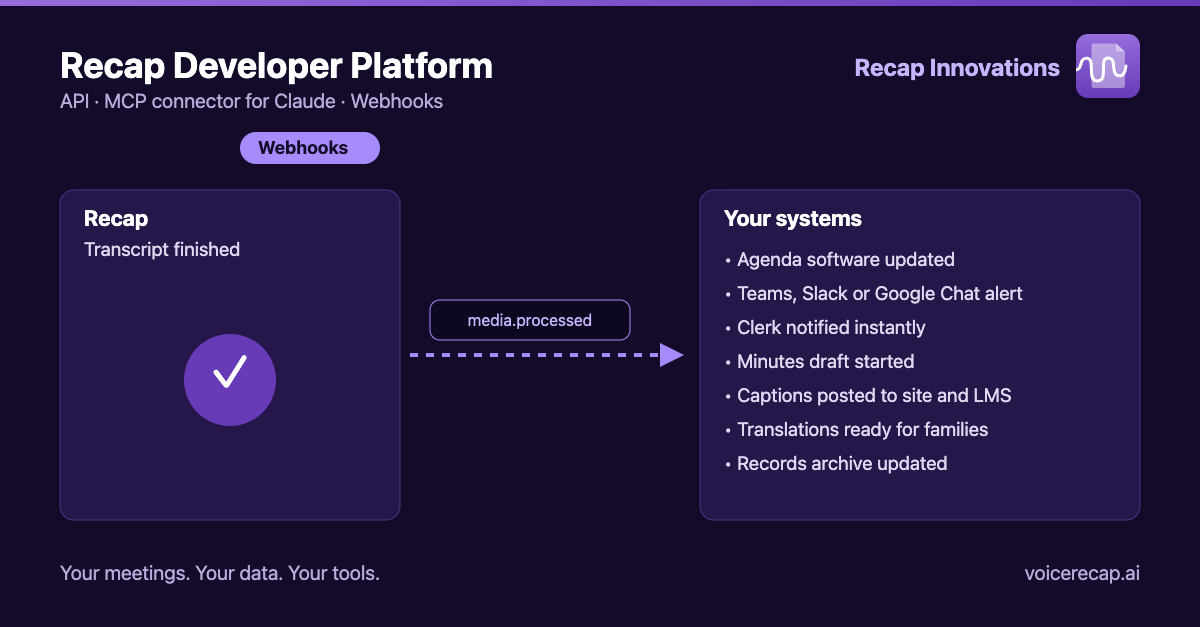
When Recap finishes, your systems take over
Webhooks and the API turn a finished transcript into the next step of your workflow. Choose your organization type to see what teams typically automate.
Council meeting transcript is ready
Regular Meeting · 2h 14m
Signed notification sent to your secure endpoint- Attach captions and transcript to the matching agenda item
- Alert the clerk in Teams, Slack or Google Chat
- Start a structured minutes draft for review
- Queue a plain-language summary and translations for residents
- Add the meeting to the searchable records archive
Examples of what teams can build. Works with the tools you already use, including Power Automate, Zapier and internal systems.
What teams like yours build
City & county government
- Clerk-ready minutes drafts from every meeting
- Faster public records responses across the whole archive
- Captions and transcripts attached to agenda items automatically
- Residents get translated summaries without extra staff work
School districts
- Plain-language board summaries translated for families
- Policy tracking across multiple readings and meetings
- Action items flow into your board portal or project tracker
- Training and PD video lands in the LMS with captions attached
Colleges & universities
- Library-wide caption and audio description workflows
- Accessibility office dashboards across every department
- Back-fill historical lecture libraries without manual steps
- Usage reporting for departmental cost allocation
See also local government, K-12 district and technical college solutions, and our ready-made platform integrations.
Custom integrations you own, without the custom-build risk
Recap supplies the accessibility and AI engine. You decide what to build on top of it, who builds it, and how it is governed.
| What matters | One-off custom integration | Building on Recap |
|---|---|---|
| Time to first working integration | Months of discovery, contracting and development | Faster, because you build against a documented API |
| Who controls the workflow | The vendor or a contractor | Your IT team, on your timeline |
| When a platform changes | Custom connectors can break and wait for a fix | Your integration points to a stable, documented API |
| Handling thousands of videos | Manual batches, spreadsheets and email | Automated submission and notification at any volume |
| Asking questions of meeting records | Search a folder of files by hand | Ask in plain English and get a sourced answer |
| Security review | A new system to vet from scratch | One workspace, one set of permissions, admin-managed access |
Permissioned by design
Access is tied to Recap sign-in and workspace permissions. Assistants and integrations see only what the signed-in person can.
Admin-controlled
Workspace admins manage developer access from one place and can change or revoke it.
Verifiable events
Webhook notifications are signed so your systems can confirm they came from Recap, and they never carry your content.
Procurement-ready
Delivered under an annual plan with documented scope, which fits purchasing, legal and RFP requirements for an accessible, documented API.
Read more on our security page.
How to get started
The developer API, MCP connector and webhooks are available on annual plans.
- Tell us what you want to build.
A short call about your volume, systems and goals. - Choose an annual plan.
We scope it to the hours of video you process. - Enable developer access.
A workspace admin turns on access and connects Claude if you want it. - Build and launch.
Your team, your vendor or ours builds against the documented API.
Developer platform FAQ
Which plans include the Recap developer API and MCP connector?
The developer API, the MCP connector for Claude and other AI assistants, and webhooks are available on annual plans. Talk to us about your volume and we will scope the right annual plan for your organization.
Do we need developers to use this?
To build custom integrations with the API and webhooks, yes: your IT team, a vendor you already work with, or our team can do it. The MCP connector does not require development. A workspace admin connects Recap to Claude or another MCP-compatible assistant, and staff can start asking questions about meetings in plain English.
Can the API handle thousands of videos?
Yes. The API is designed for hands-off, high-volume workflows: your system submits recordings as they are created or from an existing backlog, Recap processes them in parallel, and your system is notified automatically as each one finishes. Nobody has to babysit a queue or re-upload files. Contact us to talk through your expected volume.
Who can see our data when we connect an AI assistant?
Access follows your Recap login and workspace permissions, so an assistant can only reach what the signed-in person is already allowed to see. Workspace admins manage developer access from one place and can revoke it at any time.
Do webhook notifications contain our transcripts or video content?
No. Webhook notifications are signed so you can verify they came from Recap, and they announce that something finished without carrying the content itself. Your systems then retrieve what they need through the authenticated API.
What can we build with the Recap API?
Common builds include automatically sending new meeting recordings to Recap, publishing captions and transcripts back to your website, agenda software, or LMS, starting minutes drafts from transcripts, preparing translations for families, feeding a searchable records archive, and pulling usage into leadership dashboards.
Is AI output from the connector safe to publish?
AI is a fast first pass. Answers point back to the transcript so staff can jump to the exact moment in the recording and confirm the wording before anything official is published.
How do we get API access once we are on an annual plan?
A workspace admin manages developer access in the Recap platform under Settings, then Developer. If you would like help scoping a build or connecting Claude for the first time, our team will walk through it with you.
What is the difference between the API and Recap’s ready-made integrations?
Ready-made integrations connect Recap to platforms such as Kaltura, Panopto, YouTube, Vimeo, Brightcove and Wistia without writing code. The developer API is for everything else: your agenda software, website CMS, records archive, internal tools and any workflow unique to your organization. Many teams use both.
What can we get back from Recap through the API?
The same things your staff work with in Recap: captions and transcripts, AI summaries, translations, audio descriptions, and AI voiceovers. Your system chooses which services to request for each recording and retrieves the finished results when they are ready.
Does the MCP connector only work with Claude?
The connector is built on the open Model Context Protocol, so it works with Claude and with other MCP-compatible AI assistants. Whichever assistant you use, access still follows your Recap sign-in and workspace permissions.
Can a contractor or our existing software vendor build the integration?
Yes. Because the API is documented, your IT team, a vendor you already work with, or our team can build against it. Workspace admins decide who gets access and can change or revoke it at any time, so a contractor engagement does not mean handing over your whole account.
How do we handle a large back catalog of existing videos?
Start by pointing your integration at the existing library and submitting it in the same automated way you will handle new recordings. Recap processes the work in parallel and notifies your systems as each item finishes, so staff review exceptions instead of touching every file. We are happy to help plan the order of a large back-fill.
Can we add translations and audio descriptions to the same automated workflow?
Yes. For each recording your system can request captions, translations into the languages your community speaks, and standard or extended audio descriptions together, then publish the results wherever the video lives. See our language support and audio description pages for what is available.
Where can we read about security and data handling before we commit?
Our security page describes how Recap protects your data, and your account team can supply the documentation your procurement, legal and IT security reviewers ask for.
What if we are not on an annual plan today?
Tell us what you want to build and how many hours of video you process. We will scope an annual plan that includes developer access and show you what the first integration could look like.
Ready to build on Recap?
Tell us about your systems and your volume. We will show you what your team can build and what an annual plan looks like.