Introducing the Recap developer API, Claude connector, and webhooks
Recap now has a public developer API, an MCP connector for Claude and other AI tools, and webhook notifications. Together they let your team connect Recap's captions, transcripts, summaries, translations, and audio descriptions to the software you already use, and let you ask questions about a meeting in plain English.
Text description of this animation
The animation has three scenes and repeats.
- API. A recording of a City Council regular meeting, 2 hours 14 minutes long, is uploaded through the Recap API with no manual steps. Recap returns a transcript with speaker labels (Mayor Lee moves to approve the transit contract, Commissioner Ortiz seconds, and the Clerk reports a 5 to 1 roll call) plus an AI summary: the transit contract was approved 5 to 1.
- MCP connector. In Claude, connected to Recap, someone asks "What did the board decide on the bus contract?" Claude answers that the board approved the transit contract 5 to 1, that Route 9 changes were discussed before the vote, and that Commissioner Ortiz seconded the motion. The answer cites the transcript at 1:12:40.
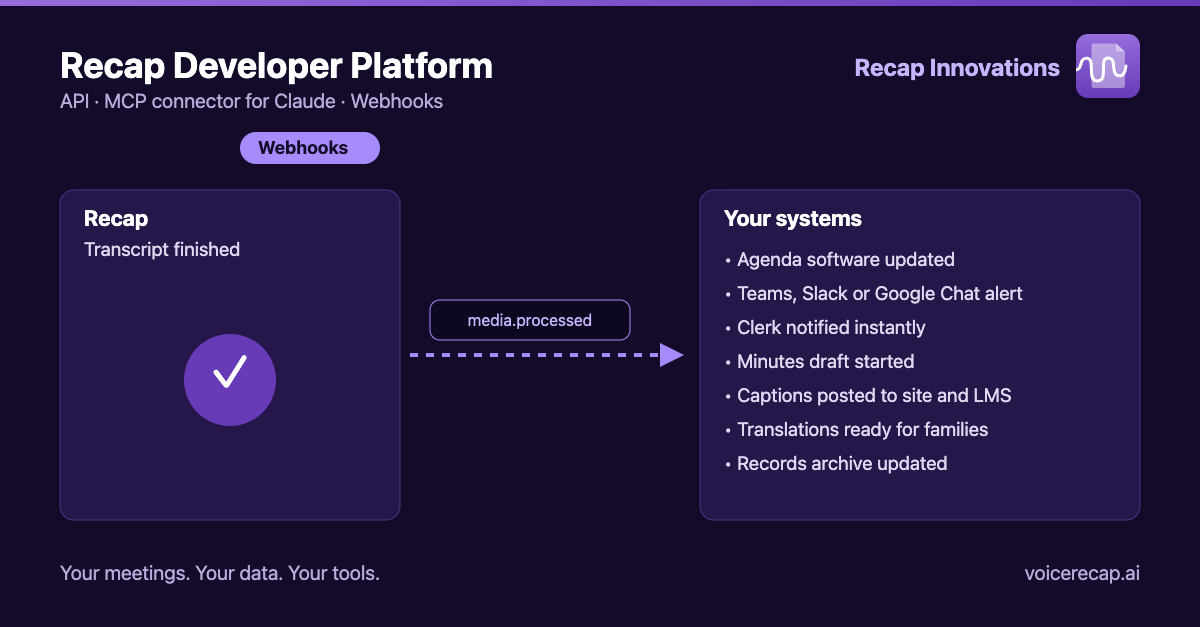
- Webhooks. When Recap finishes a transcript, it sends a
media.processednotification to your systems. In the example, your systems then update the agenda software, send a Teams, Slack or Google Chat alert, notify the clerk, start a minutes draft, post captions to the website and LMS, prepare translations for families, and update the records archive.
Why we built it
Most of our customers don't work in Recap all day. A city clerk lives in agenda software. A district communications director lives in the website CMS and the board portal. A training team lives in the LMS. Accessibility work and meeting records are most useful when they show up inside those tools, without someone downloading a file and re-uploading it somewhere else.
State and consortium procurements have also started asking for an accessible, documented API as a requirement. We built one so you can say yes.
What's new
Developer API
A documented REST API gives your developers programmatic access to the same media, transcripts, summaries, translations, and audio descriptions you work with in Recap. Submit a recording, request the services you need, and retrieve the results from your own code. Sign-in uses standard OAuth, and API keys are managed by workspace admins under Settings → Developer.
MCP connector for Claude and other AI tools
The Model Context Protocol (MCP) is an open standard that lets AI assistants work with outside systems. With the Recap connector, you can connect Claude, or another MCP-compatible assistant, to your Recap account. Your meeting library stops being a pile of files and becomes something you can ask questions of.
Access follows your Recap account and workspace permissions, so the assistant only sees what you're already allowed to see.
Webhooks
Instead of checking back to see whether a job is done, register an HTTPS endpoint and Recap will notify it when a transcript, summary, translation, or audio description is ready. Notifications are signed so you can verify they came from Recap. They announce that something finished; they don't carry the transcript or summary text itself, so your systems retrieve the content through the authenticated API.
Ask your meeting anything: transcripts plus AI
The feature people react to most is also the simplest. Connect Recap to Claude, and a three-hour meeting becomes a conversation:
- "What did the board decide about the transportation contract, and who voted against?"
- "Summarize every public comment about the zoning change."
- "List all action items assigned to the Parks Department."
- "At what point in the meeting did the budget amendment come up?"
- "Draft a plain-language recap of last night's meeting for the newsletter."
- "Compare what was said about the levy in October and November."
Answers point back to the transcript, so staff can jump to the moment in the recording and confirm the exact wording before anything is published. AI is a fast first pass; a person still makes the call on anything official.
Use cases for city government
Faster minutes and meeting records. Pull the transcript and summary into your drafting process. The clerk starts with a structured first draft instead of a blank page, then edits and approves.
Public records requests. When a resident asks "what was said about the Elm Street project in 2026?", staff can ask across the meeting library rather than scrubbing through hours of video.
Agenda and website integration. Use the API to attach captions and transcripts to the matching agenda item automatically, and use a webhook to trigger the next step as soon as processing finishes.
Department briefings. A city manager can ask for everything relevant to one department across a quarter of council and committee meetings, with sources.
Accessibility by default. Captions, translations, and audio descriptions can be requested from the same workflow that publishes the recording, supporting your ADA Title II obligations without an extra manual step.
Use cases for school districts and school boards
Board meeting summaries for families. Turn a long evening meeting into a short, plain-language summary and translate it for the families who speak the languages in your district.
Policy tracking. Ask Claude how a policy has been discussed over multiple meetings, who raised concerns, and what changed between readings.
Board packets and follow-up. Pull action items and decisions into your board portal or project tracker so nothing discussed gets lost between meetings.
Training and LMS content. Connect professional development videos and instructional content to your learning management system so captions and transcripts arrive with the video.
Communications. A communications director can ask for the three quotes that best capture the superintendent's budget remarks, then verify each one against the recording before it goes out.
Use cases for any organization
- Workflow automation. Use webhooks with Power Automate, Zapier, or internal tools to start the next step when processing finishes.
- Searchable archives. Feed transcripts into your own search or records system.
- Custom reporting. Pull usage and library data into the dashboards your leadership already reads.
Built with data protection in mind
Connecting AI tools to meeting records raises fair questions, so a few principles guided the design:
- You choose what's connected. Access is tied to your Recap login and workspace permissions.
- Webhook notifications announce events without including your content.
- Workspace admins control developer access and can manage it from one place.
For more on how we handle your data, see our security page.
Getting started
If you're a Recap customer, workspace admins can find developer settings in the platform. If you're not yet a customer and want to see how this fits your meeting workflow, we're happy to walk through it.
The API, connector, and webhooks are new, and we're shaping what comes next with the teams using them. If there's an integration or a question you'd like to be able to ask your meetings, tell us.