Multi-lingual Video Captioning: Supporting Dual-Language Content and Side-by-Side Translations
Educational institutions worldwide face a growing challenge: creating accessible content for videos that contain multiple languages. Whether you're supporting language courses where instructors switch between their target language and English, serving multilingual student populations, or providing content for international audiences, traditional captioning tools often fall short.
If you've ever received auto-generated or professional captions that show "[FOREIGN LANGUAGE...]" or gibberish for portions of your video, you know the frustration. But there's a better way.
For e-learning module workflows (Articulate, Canvas, SCORM), see our guide on how to auto-generate dual-language captions for e-learning modules.
The Multi-Language Challenge in Education
Language instructors frequently ask us: "Can your tool handle videos where I switch between Spanish and English throughout my lecture?" Similarly, institutions serving diverse populations need captions for videos containing multiple languages spoken naturally within the same content.
Traditional captioning services typically handle only the dominant language, leaving portions of your video uncaptioned or marked as "foreign language." This creates several problems:
ADA Compliance Issues
For accessibility compliance, captions must be provided in the language of the audio. If your video contains both English and Spanish, you need captions that accurately transcribe both languages. Leaving sections uncaptioned fails to meet WCAG 2.1 Level AA requirements.
Suboptimal Workarounds
Many institutions have been forced to use time-consuming workarounds:
- Generating separate caption files for each language and manually combining them
- Choosing to caption only the dominant language, leaving other sections inaccessible
- Manually editing gibberish auto-captions to add the correct non-dominant language text
- Creating separate versions of the same video for each language
These approaches are expensive, time-consuming, and often result in incomplete accessibility.
How Recap Solves Multi-Language Captioning
Recap Innovations provides comprehensive support for multi-language video content through three key capabilities: automatic multi-language detection, professional translation services, and side-by-side transcript viewing.
1. Single-File Multi-Language Transcription
When you upload a video to Recap, you can specify multiple languages spoken in the content. Recap will automatically detect language switches and accurately transcribe each segment in its original language.
How it works:
- Upload your video through the Recap platform or via LMS integration
- Select languages you want transcribed (you can select as many as needed)
- Specify primary language for the file (used as the main language reference)
- Automatic processing detects language switches and transcribes each segment accurately
For example, a Spanish language instructor who switches between Spanish and English throughout a 20-minute lecture video will receive a single transcript with accurate captions for both languages. Spanish segments transcribed in Spanish, English segments transcribed in English.
Supported scenarios:
- Language courses (instructor teaching target language with English explanations)
- Multilingual presentations and conferences
- International student interviews or testimonials
- Videos with embedded foreign language quotes or references
- Bilingual instructional content
Languages supported for multi-language detection:
Recap supports automatic multi-language transcription for 70+ languages including:
- Spanish (all dialects)
- French
- German
- Mandarin Chinese
- Cantonese
- Japanese
- Korean
- Arabic
- Portuguese
- Italian
- Russian
- Hindi
- And 60+ more languages
For language course instructors, this means your students see accurate captions throughout the entire video, regardless of which language you're speaking at any given moment. No more "[FOREIGN LANGUAGE...]" placeholders or manual editing required.
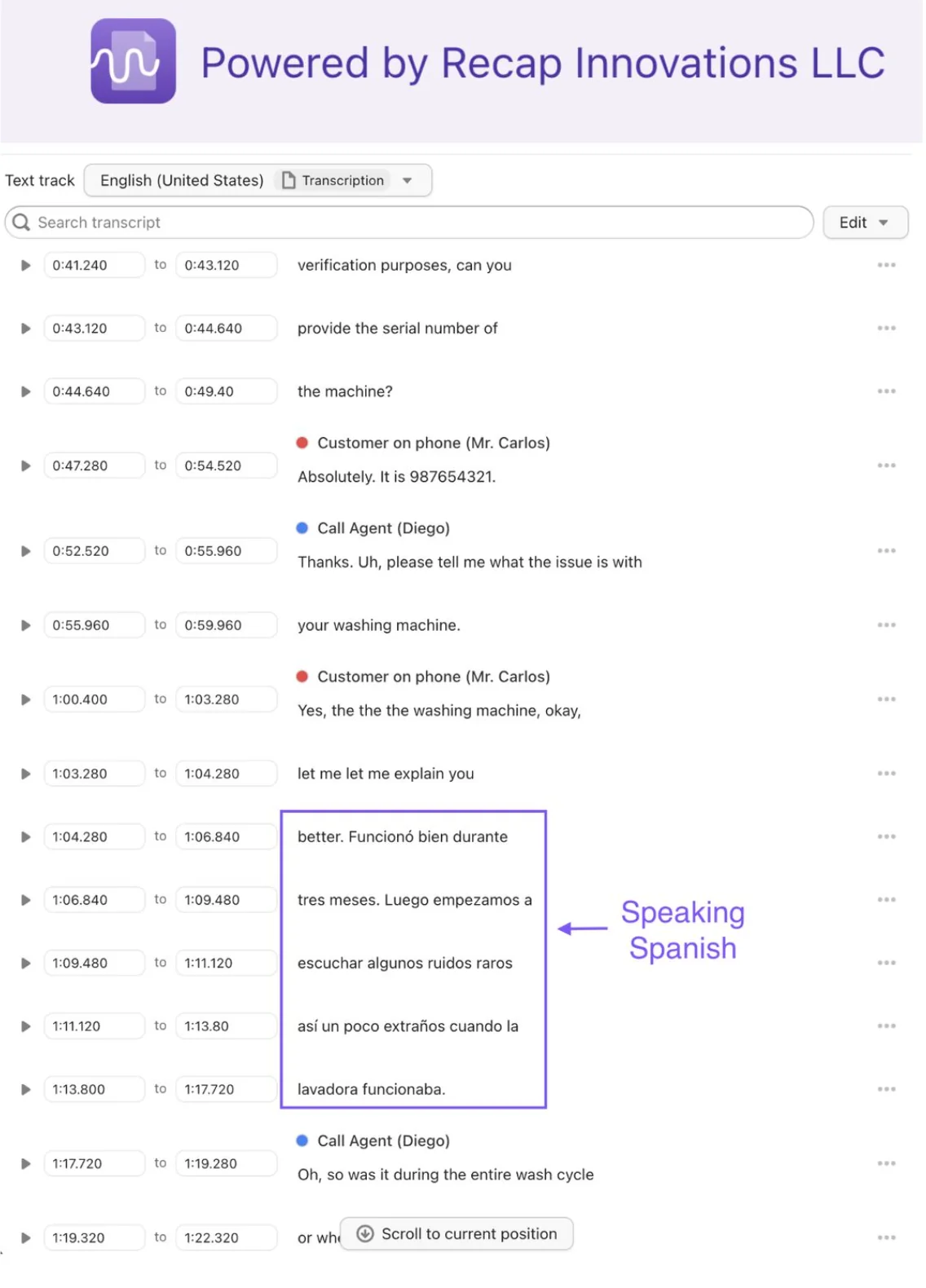
2. Translation with Side-by-Side Transcript View
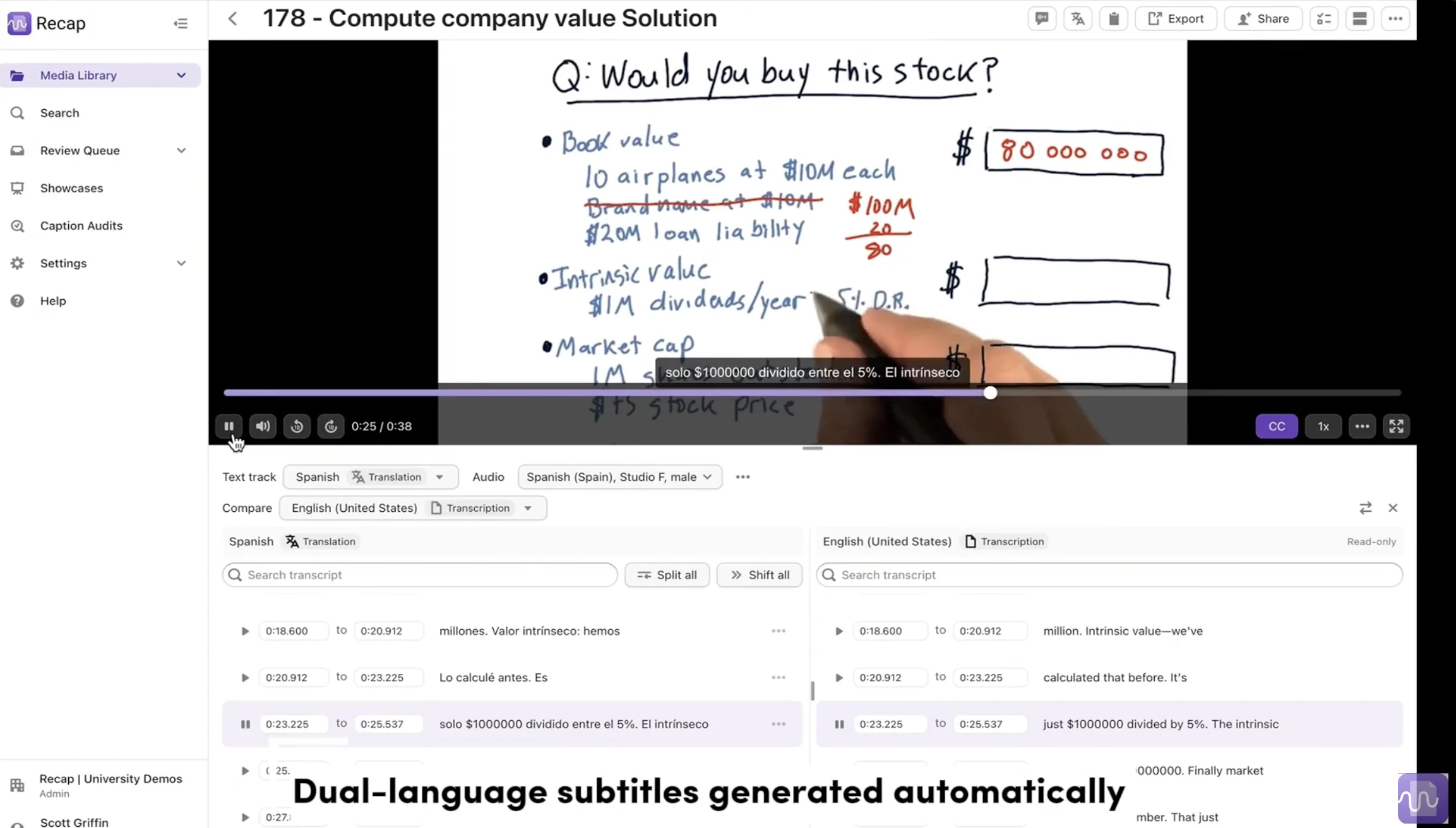
Beyond transcribing multi-language audio, Recap also offers professional translation services with a unique side-by-side viewing experience that's particularly valuable for language learning and multilingual audiences.
How it works:
- Transcribe your video in its original language (or multiple languages)
- Request translation into 190+ target languages
- View side-by-side in the dual transcript viewer, showing original and translated text simultaneously
- Switch between languages or swap which language is primary
This feature is transformative for several use cases:
Language Learning
Imagine a French instructor creates lecture videos in French. With Recap's side-by-side transcript viewer, students can:
- View the original French transcript alongside an English translation
- Follow along in both languages simultaneously
- Better understand context and vocabulary
- Study the transcript after class with both versions available
Subject matter experts, such as faculty and students, can review translations to improve accuracy, benefiting future students who access the same content.
Multilingual Student Support
For institutions serving international student populations, provide the same video with transcripts in multiple languages. Students can:
- Select their preferred language for captions
- View original language alongside their native language
- Better comprehend complex academic content
International Collaboration
For universities with international partnerships or distance learning programs:
- Create content once in your primary language
- Provide translations for partner institutions
- Enable cross-border collaboration with accessible, multilingual content
Translation quality:
Recap uses advanced AI-powered translation with accuracy rates above 95% for most language pairs. For critical content, human review options are available to ensure cultural appropriateness and terminology accuracy.
Languages supported for translation:
We support translation into 190+ languages, including:
- All major world languages
- Regional dialects
- Specialized academic and technical terminology
- Right-to-left languages (Arabic, Hebrew)
- Complex character systems (Chinese, Japanese, Korean)
3. Multiple Caption Tracks for Student Choice
Rather than forcing a single caption language, Recap allows you to generate and publish multiple caption tracks. Students can choose which language they prefer to view:
- Original language captions for native speakers
- English subtitles for international content
- Multiple language options for diverse classrooms
This "choose your language" approach combines the best aspects of captions (accessibility accommodation) and subtitles (translation for comprehension).
How it works in your LMS:
When you embed a Recap video in your LMS (Canvas, Blackboard, Moodle, D2L, etc.), students see a language selector in the video player. They simply choose their preferred language, and the captions update accordingly. There is no need to create separate videos or manually upload multiple caption files.
Real-World Use Cases
Language Courses
Challenge: An online language program needs to caption hundreds of instructional videos where professors switch between the target language (Spanish, French, Mandarin, etc.) and English throughout each lecture.
Solution: Instructors upload videos with both languages selected. Recap automatically detects language switches and transcribes each segment accurately. Students can view the original dual-language transcript or add English translations for additional support.
Result: Complete accessibility compliance, improved student comprehension, and zero manual caption editing required.
International Student Support
Challenge: A university with 25% international student enrollment needs to make all course content accessible to non-native English speakers while maintaining ADA compliance.
Solution: Professors create content in English (transcribed automatically). The institution translates key content into the top 5 languages spoken by their student population. Students choose their preferred caption language when viewing videos.
Result: Improved student success rates, better comprehension of complex material, and enhanced accessibility for both English language learners and deaf/hard-of-hearing students.
Multilingual Public Lectures and Events
Challenge: A university hosts public lectures, conferences, and events with international speakers. Videos need captions in multiple languages for different audiences.
Solution: Upload video with primary language transcription, then generate translations for target audiences. Publish to website with multiple caption track options.
Result: Broader audience reach, improved accessibility, and ability to serve diverse communities.
Technical Implementation
For IT and Accessibility Teams
Recap's multi-language support integrates seamlessly with your existing video infrastructure:
Upload options:
- Direct upload via web interface
- Bulk upload via API (enterprise-only access)
- Integration with Panopto, Kaltura, Brightcove, YouTube, and more
- Canvas, Blackboard, Moodle, D2L LMS integrations
Caption delivery:
- Automatic caption file generation (WebVTT, SRT, DFXP, TTML, SCC)
- Multiple language tracks delivered simultaneously
- Automatic publishing to integrated platforms
- Manual download options for any caption format
API access (Enterprise-only, coming soon):
For institutions with custom needs, our API supports:
- Programmatic upload with language specification
- Bulk translation requests
- Caption file retrieval in multiple languages
- Integration with custom video platforms
Addressing Common Questions
"Isn't this just automatic detection? Other tools claim to do this."
Many tools claim automatic language detection, but most only detect the dominant language and mark other sections as "foreign language." Recap's multi-language detection is specifically designed to handle code-switching and multiple languages within the same video, accurately transcribing each segment in its original language.
"Do I need separate caption tracks or one combined track?"
Both approaches are valid depending on your use case. Recap generates a single unified caption file that contains the natural language switches (great for language courses), and can also generate separate language tracks (great for providing multiple viewing options to students).
"What about ADA compliance? Does this meet the requirements?"
Yes. ADA requires captions in the language of the audio. If your video contains both English and Spanish, Recap's multi-language transcription provides accurate captions for both languages, meeting WCAG 2.1 Level AA requirements.
According to ADA guidelines, captions are needed for accessibility in the language spoken. Translations into other languages (subtitles) are beneficial but not strictly required for ADA compliance. However, multi-language captioning makes your content more accessible to everyone, regardless of native language.
"How accurate is the translation?"
Our AI-powered translation achieves 95%+ accuracy for most language pairs, with specialized terminology support for academic, medical, legal, and technical content. Subject matter experts at your institution, like faculty, TAs, and students, can review translations to improve accuracy for critical content.
"What if students find errors in translations?"
Subject matter experts familiar with the language can suggest improvements to videos and translations hosted by Recap Innovations, which moderators review and approve. This community-driven approach continuously improves translation quality while engaging students in the learning process.
Comparison with Other Tools
| Feature | Recap | Panopto | 3Play Media | Rev |
|---|---|---|---|---|
| Single-file multi-language transcription | ✅ Automatic | ❌ Manual workaround | ❌ Separate files | ❌ Dominant language only |
| Side-by-side transcript viewer | ✅ Built-in | ❌ | ❌ | ❌ |
| Multiple caption track delivery | ✅ Automatic | ✅ Manual | ✅ Manual | ❌ |
| Human moderation support | ✅ | ❌ | ❌ | ❌ |
| Languages supported | 70+ transcription, 190+ translation | 10-15 | 40+ | 15+ |
| Academic terminology support | ✅ | Limited | ✅ | Limited |
| LMS integration | ✅ Automatic | ✅ | Manual upload | Manual upload |
Getting Started with Multi-Language Captioning
For Language Instructors
If you create instructional videos in multiple languages:
- Upload your video via your LMS or the Recap web interface
- Select all languages spoken in the video
- Specify which language is primary
- Recap automatically detects language switches and transcribes accurately
- Students see accurate captions throughout the entire video
For Institutions Serving Multilingual Populations
If you need to provide content in multiple languages:
- Upload and transcribe video in its original language
- Request translations for your target languages (select as many as needed)
- Translations are automatically generated and published
- Students choose their preferred caption language when viewing
For Accessibility Coordinators
If you're responsible for ensuring compliance:
- Multi-language transcription ensures accurate captions for all spoken languages (ADA compliant)
- Side-by-side viewing supports language learners and international students
- Multiple caption track delivery provides options without duplicate videos
- Automatic integration with your LMS reduces manual caption file management
Pricing and Implementation
Multi-language transcription and translation services are included in all Recap Innovations plans. Pricing is based on video duration, not the number of languages.
Transcription pricing:
- AI-powered transcription: Standard per-minute rate (same whether single or multi-language)
- Human review: Available for critical content
- Bulk upload discounts: Available for large implementations
Translation pricing:
- AI-powered translation: Per-minute rate per target language
- Human review: Available for critical translations
- Unlimited caption downloads and republishing
Implementation:
- Standard setup: 2-4 weeks for LMS integration
- Training provided for faculty and staff
- Ongoing support and consultation included
- Dedicated account manager for institutional clients
Conclusion: Making Multi-Language Content Accessible
Educational institutions no longer need to choose between accessibility, affordability, and multi-language support. Recap Innovations provides:
✅ Single-file multi-language transcription for videos with multiple spoken languages
✅ Professional translation services in 190+ languages
✅ Side-by-side dual-language transcript viewing for language learning and comprehension
✅ Multiple caption track delivery for student choice
✅ Seamless LMS integration for automatic caption publishing
✅ ADA compliance for multi-language content
Whether you're supporting language courses, serving multilingual populations, or expanding to international audiences, Recap makes multi-language video accessibility achievable and affordable.
Ready to Transform Your Multi-Language Video Accessibility?
We understand the unique challenges of multi-language video content because we've built our platform specifically to solve them.
Schedule a demo to see how Recap handles your multi-language content, or upload a sample video to test our multi-language transcription and translation capabilities.
Contact us:
- Schedule a call: recap-innovations.com/demo
- Learn more: recap-innovations.com
- Email: sales@recap-innovations.com
About Recap Innovations
Recap Innovations provides enterprise video accessibility solutions for educational institutions, government agencies, and organizations worldwide. Our platform delivers professional transcription, captioning, audio description, and translation services with seamless integration into leading Learning Management Systems and video platforms.
Trusted by institutions including:
- Purchasing consortiums for community colleges
- K-12 districts
- Video production companies
- Government agencies
All Recap services are backed by our SLA accuracy guarantee, SOC 2 Type II certification, and dedicated support from our accessibility experts.